


Keystone OIDC
- Authorization Code flow with PKCE
- RS256 signed tokens
- Discovery and JWKS
- Refresh token rotation
Turn your WordPress site into an OpenID Connect identity provider. Other applications sign users in against your existing WordPress accounts, with no external identity service.
Scroll to exploreOne set of WordPress accounts for every application.
Every application wants its own user database
Applications sign users in with their existing WordPress account through standard OpenID Connect.
A separate identity provider is a lot to run for a small team
Keystone OIDC is a plugin for the WordPress site you already host. No external identity service is needed.
Third-party applications ask for passwords
The application never sees the password. Users approve each application and its scopes on a consent screen, and the application receives tokens.
Tokens you cannot verify are tokens you cannot trust
Tokens are signed with RS256, clients verify them through the JWKS endpoint, keys can be rotated and public clients must use PKCE.
WordPress already knows your users
Many projects already keep their people in WordPress. Keystone OIDC lets those accounts open other applications too, so you do not run a second identity system.
- Dashboards, internal tools, command line clients and mobile apps can use standard OIDC to sign in against WordPress
- Libraries such as openid-client for Node.js, python-jose, Keycloak adapters and Dex read the discovery document and configure themselves
- Apps with their own OIDC login, for example Kairos and S3 Web UI, can point at it like any other provider
- This site uses it too: the plugin is installed on wenisch.tech


Standards-based, with sensible defaults
Authorization Code flow
Standard OpenID Connect Core 1.0 and OAuth 2.0 authorization code flow.
PKCE
S256 and plain code challenges. Public clients must use S256.
RS256 signed tokens
Access tokens and ID tokens are signed JWTs that clients verify through the JWKS endpoint, with no shared secret.
Refresh tokens with rotation
Each refresh token is single use: when it is used, it is revoked and a new one is issued.
Discovery document
Clients configure themselves from one well-known URL.
Multiple clients
Create and manage as many applications as you need, confidential or public.
Show all 12 features
Client secret handling
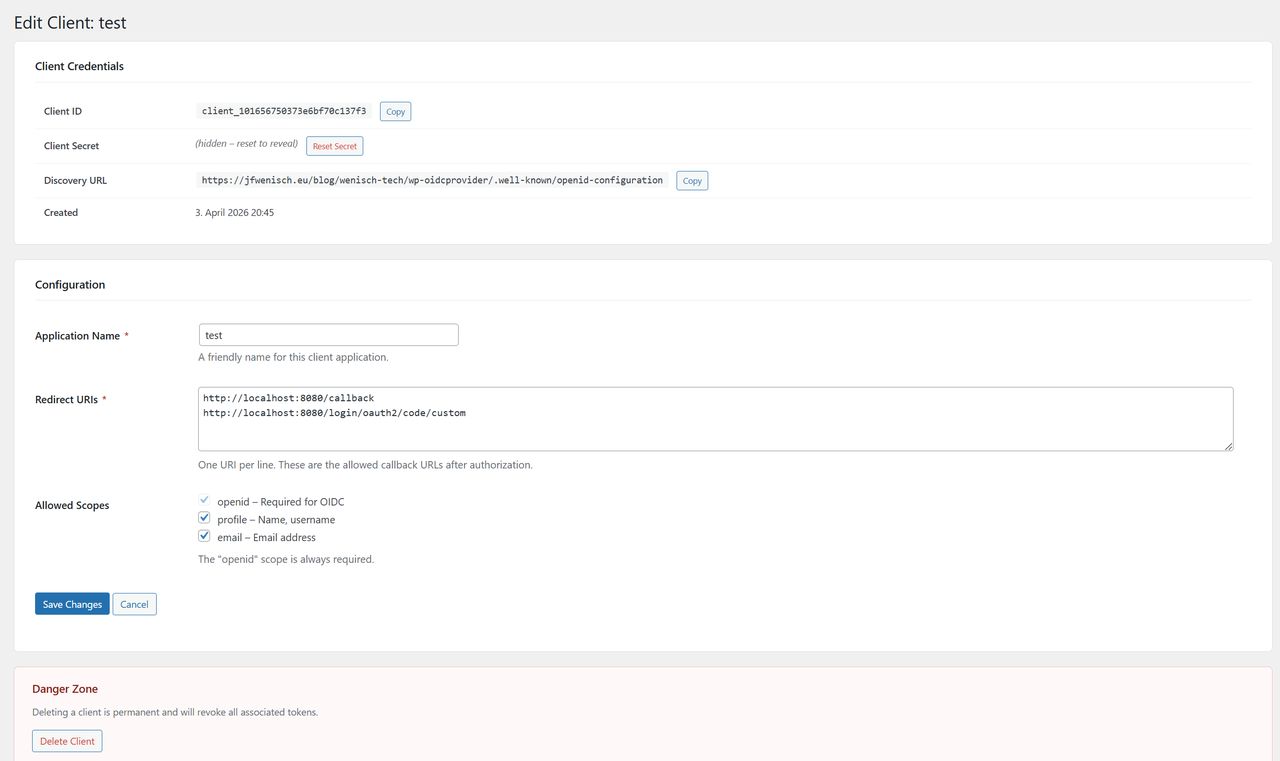
Secrets are shown once, stored only as a bcrypt hash and can be reset at any time.
Consent screen
Users approve each application and the scopes it asks for, and can revoke access later from their account settings.
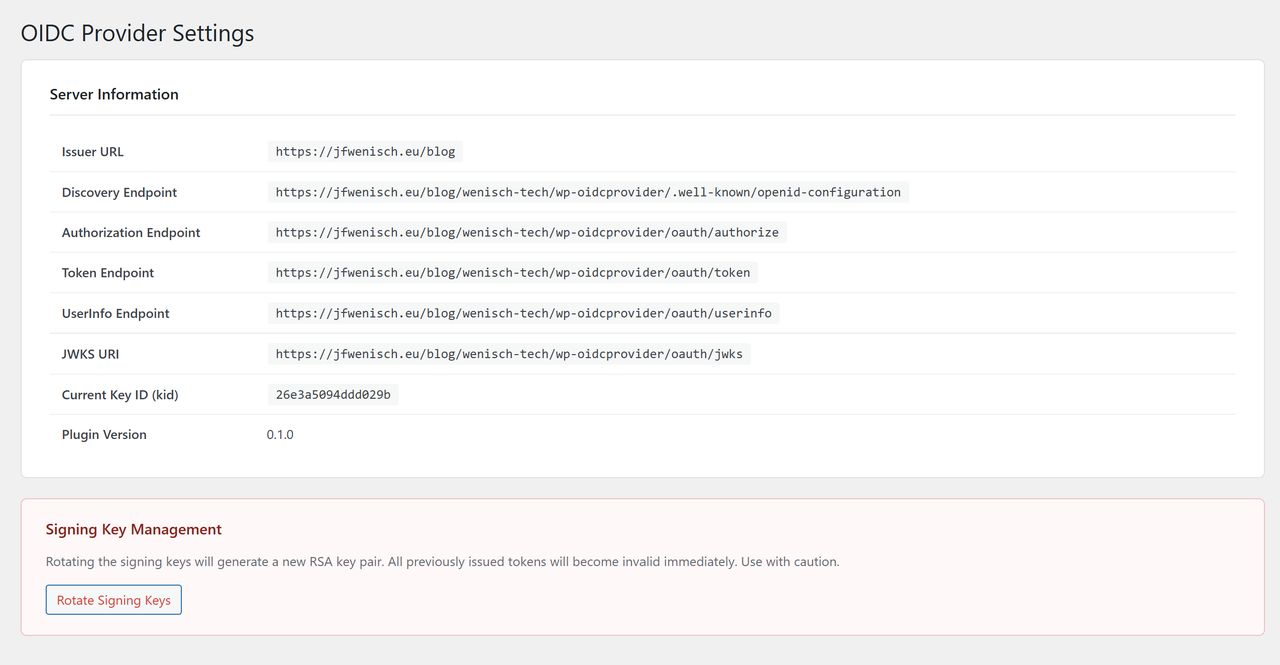
Signing key rotation
Rotate the RSA key pair from the admin panel. Token headers carry a key ID so clients pick the right key.
WordPress roles as claims
The roles scope releases a user's WordPress role slugs. A filter lets you adjust them.
Automatic cleanup
Expired authorization codes and revoked tokens are removed for you.
Keycloak-style paths
Compatibility routes for clients that derive Keycloak-style paths from the issuer.
The authorization code flow
Six steps from the first redirect to the user’s claims.
Redirect to authorize
The client sends the browser to the authorize endpoint with response type, client ID, redirect URI, scope and state.
Log in if needed
WordPress’s own login handles authentication, then returns to the authorize endpoint.
Consent
A screen lists the requested scopes. The user chooses Allow or Deny.
Authorization code
On approval, a single-use code valid for 10 minutes is issued and the browser returns to the redirect URI.
Token exchange
The client’s backend exchanges the code at the token endpoint and receives an access token, an ID token and a refresh token.
User info
The client calls the userinfo endpoint with the bearer token to read current claims.
Token lifetimes
| Token | Lifetime |
|---|---|
| Authorization code | 10 minutes |
| Access token (JWT) | 1 hour |
| ID token (JWT) | 1 hour |
| Refresh token | 30 days, single use |
Confidential clients authenticate at the token endpoint on every request. Public clients have no secret and must use PKCE with S256.
Endpoints, scopes and claims
All paths are relative to your WordPress site root.
| Endpoint | Method | Path |
|---|---|---|
| Discovery | GET | /wenisch-tech/keystone-oidc/.well-known/openid-configuration |
| Authorization | GET / POST | /wenisch-tech/keystone-oidc/oauth/authorize |
| Token | POST | /wenisch-tech/keystone-oidc/oauth/token |
| UserInfo | GET | /wenisch-tech/keystone-oidc/oauth/userinfo |
| JWKS | GET | /wenisch-tech/keystone-oidc/oauth/jwks |
Scopes and claims
| Scope | Claims |
|---|---|
openid | sub, iss, aud, iat, exp, jti |
profile | name, given_name, family_name, preferred_username |
email | email, email_verified |
roles | roles, an array of WordPress role slugs |
The sub claim is always the WordPress user ID as a string, so identities stay stable. WordPress has no native groups, so no groups claim is emitted.
Built so the defaults are the safe choice
Secrets are never kept in plain text
A client secret is a random 64-character value, hashed with WordPress's bcrypt-based password hashing and shown once in the admin UI.
Your own signing keys
A 2048-bit RSA key pair is generated on activation with PHP's openssl extension. The private key is never exposed in any UI, and rotation is one click.
Exact redirect matching
The redirect URI in a request must match a registered URI exactly, including scheme, host, path and trailing slash.
PKCE for public clients
Single-page and mobile apps have no secret, so they must use PKCE with S256.
Single-use refresh tokens
Using a refresh token revokes it and issues a new pair, which limits the damage of a leaked token.
Consent per application
Users see which application asks for which scopes before anything is released.
Manage clients from wp-admin
Register applications, copy credentials and rotate signing keys without leaving WordPress.

Two steps after activation
Install from the WordPress.org directory, or upload the ZIP from the GitHub releases page under Plugins, Add New, Upload Plugin.
Full installation guide
Step-by-step setup, configuration options and troubleshooting for Keystone OIDC.
Create a client
In wp-admin open OIDC Provider, Add Client. Enter an application name, one redirect URI per line and the scopes it needs, then create it. Copy the client ID and the secret now, the secret is shown once.
Configure your application
Point your OIDC library at the discovery URL, enter the client ID and secret, set the same redirect URI and request the openid scope, plus profile or email as needed.
Requirements
| Requirement | Minimum |
|---|---|
| WordPress | 5.6 or newer |
| PHP | 7.4 or newer |
| PHP extensions | openssl and json |
| Permalinks | Pretty permalinks must be enabled; plain ?p=123 links do not work with the rewrite rules |
https://your-wordpress-site.example.com/wenisch-tech/keystone-oidc/.well-known/openid-configurationOn activation the plugin creates three database tables for clients, authorization codes and tokens, generates the signing key pair and flushes the rewrite rules.
Looking for your own scopes? Request openid profile email roles to get identity, name, e-mail address and WordPress roles in one go.
Common problems
Endpoints return 404
Enable pretty permalinks under Settings, Permalinks, then save that page once to flush the rewrite rules.
Invalid redirect_uri
The redirect URI must match a registered one exactly. Check trailing slashes and http against https.
Invalid client
The client ID does not exist. If you deleted and recreated a client, update the ID in your application.
Token signature verification fails
The signing key may have been rotated after the token was issued. Fetch the JWKS again; most OIDC clients do this when they see an unknown key ID.
Keys are not generated
Make sure the openssl PHP extension is installed and enabled, then restart your web server.
Users are not sent back after login
A security plugin or the allowed_redirect_hosts filter may be blocking the redirect parameters. Make sure your site's domain is allowed.
Guides and reference
The full documentation is published on its own site.
Installation
Install and activate
DocsQuick start
Create a client
DocsAdmin guide
Clients and settings
DocsHow it works
The flow in detail
DocsClient types
Confidential and public
DocsScopes and claims
What each scope releases
DocsSecurity
Keys, secrets, tokens
DocsEndpoint reference
Every endpoint
DocsUpgrading
Notes between versions
DocsTroubleshooting
Fixes for common errors
Other tools from the same toolbox
Each one is open source, self-hosted and documented.

Kairos
Self-hosted uptime monitoring for HTTP services, Docker images and TCP endpoints.

Proxera
A self-hosted reverse tunnel that exposes private HTTP services without inbound ports.

S3 Web UI
A web interface for S3-compatible object storage with per-user keys and OIDC sign-in.
ContextCrate
A self-hosted RAG platform that turns websites and Git repositories into answers with citations.

SMTP2X
A self-hosted gateway that turns SMTP notifications into issues, chat messages and webhooks.
Use your WordPress accounts everywhere
Keystone OIDC is free software under the GNU GPL v2 or later, the same licence as WordPress.